

HuddleUp HuddleUp
v0.1.2 live on npm, VS Code Marketplace, and Open VSX

Hand off your AI coding session in one command.

Snapshot what Claude Code, Cursor, Codex, Copilot, or Windsurf was doing. Your teammate runs huddleup resume and picks up exactly where you left off. No re-explaining, no token waste, no midnight Slack pings.

Star on GitHub

Free, open-source, AGPL-3.0 · Node.js 20+ · macOS, Linux, Windows

bash · ~/your-project
# Dev A — before walking away $ huddleup snapshot ? Which thread does this snapshot belong to? streaming-chat-endpoint ? Where did you leave it? streaming works for short responses, breaks on >2KB Snapshot saved to threads/streaming-chat-endpoint.md Author: anand Tools: claude-code Branch: master Files: 3 # Dev B — next morning, different machine, different AI tool $ huddleup resume streaming-chat-endpoint ══════════════════════════════════════════ YOU ARE HERE Thread: streaming-chat-endpoint Owner: anand Status: active Last note: "streaming works for short responses, breaks on >2KB" ══════════════════════════════════════════ Context written to .huddleup/resume-context.md $

Works with the AI coding tools you already use

Claude Code · Cursor · Codex CLI · GitHub Copilot · Windsurf

Vibe coding is great. Until two people share a feature.

Static rules files (CLAUDE.md, .cursor/rules/) describe how your team likes to work. They tell the AI nothing about what was tried in the last session. That gap shows up three ways.

Half-finished features

Three hours of Claude Code, then you stop. A teammate opens Cursor the next morning — they have no idea what you tried, what failed, what worked.

Wasted tokens

Context dies at 10%. No one captured the plan, the dead ends, the next step. The next session has to re-derive everything from a stale CLAUDE.md.

Midnight Slack pings

"Hey, what were you doing yesterday with the auth middleware?" Re-explaining what you tried, at 11 pm, to someone who is also tired.

Two commands. One in each terminal.

Dev A captures their session as plain markdown. Dev B picks it up — in whichever AI tool they prefer. The AI starts the next prompt already knowing what was tried.

Dev A · snapshot
bash · anand@laptop
$ huddleup snapshot ? Which thread? streaming-chat-endpoint ? Where did you leave it? streaming works for short responses, fails on >2KB ? Any warnings for the next person? (none) Snapshot saved to threads/streaming-chat-endpoint.md Author: anand Tools: claude-code Branch: master Files changed: 3 Open files (inferred): 5 AI messages captured: 47 Your teammate can now run: huddleup resume streaming-chat-endpoint
Dev B · resume
bash · priya@laptop
$ git pull && huddleup resume streaming-chat-endpoint ══════════════════════════════════════════ YOU ARE HERE Thread: streaming-chat-endpoint Owner: anand Status: active Last update: 2026-06-29 22:47:00 Last note: "streaming works for short responses, fails on >2KB" ══════════════════════════════════════════ Opening relevant files: src/routes/chat.ts src/lib/stream.ts Context written to .huddleup/resume-context.md Continue where your teammate left off.

Everything teams need for seamless AI handoffs

Built for the actual loop: code with an AI tool, snapshot, hand off, resume. No backend to host. No accounts to provision.

Snapshot in seconds

Captures git diff, the last AI messages from every detected tool, inferred open files, the active branch, and your one-line note. Writes plain markdown to .huddleup/threads/<name>.md.
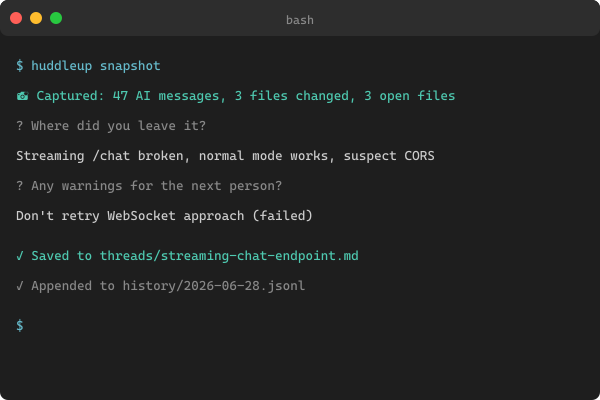
Terminal showing the huddleup snapshot command output

Resume instantly

Your teammate runs one command and gets a "YOU ARE HERE" briefing, the relevant files reopened, and a context file the AI tool reads on its next prompt. Zero re-explanation.
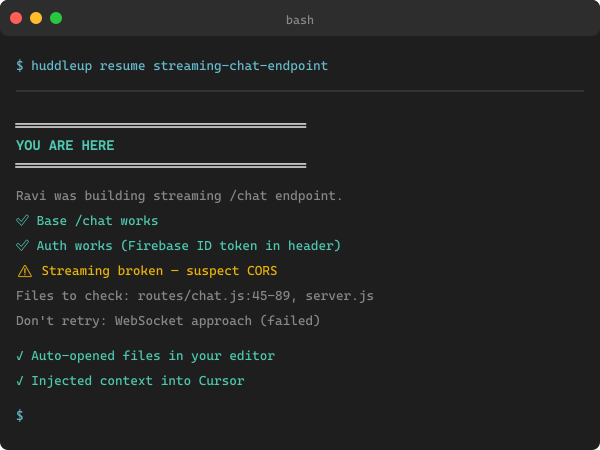
Terminal showing the huddleup resume briefing

VS Code + Cursor companion

Sidebar panel with Snapshot, Resume, Standup, and New Thread buttons. Every action is also in the command palette. Live on VS Code Marketplace and Open VSX.
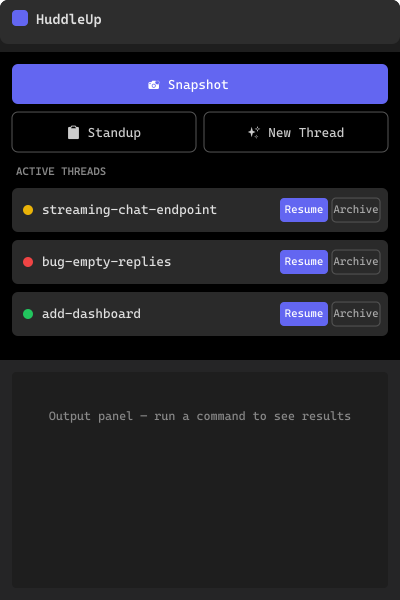
VS Code sidebar showing the HuddleUp extension panel

Multi-tool capture

Claude Code, Cursor, Codex CLI, GitHub Copilot, and Windsurf are all auto-detected. detectAllAdapters() merges messages from every tool into a single snapshot — the thread's Tools field lists every contributor.

Token Exhaustion Protocol

The generated AI-tool config files (CLAUDE.md, .cursor/rules/huddleup.mdc, AGENTS.md, .windsurfrules) tell the AI to auto-run huddleup snapshot at ~10% tokens remaining. Even if a human forgets, the AI doesn't.

Plain markdown + git

The whole .huddleup/ folder is markdown plus JSONL history. Commit it, paste in Slack, attach to a Linear ticket. No backend, no MCP server, no accounts.

Auto-detected. Cross-platform. Easy to extend.

HuddleUp probes every supported tool on the machine. Multiple adapters can match — their open files and last messages merge into a single snapshot. The thread's Tools field lists every contributor.

Cursor

Reads ~/.cursor/{sessions,chats}/ and Cursor's workspaceStorage globalStorage on macOS, Linux, and Windows.

Claude Code

Reads ~/.claude/projects/<hash>/*.jsonl (modern) and ~/.claude/sessions/*.jsonl (legacy). Generates CLAUDE.md with the Token Exhaustion Protocol.

Windsurf

Detects ~/.windsurf/, ~/.codeium/, and the Windsurf/Codeium application data folders across platforms.

GitHub Copilot

Reads VS Code globalStorage (github.copilot-chat) for Code, Code Insiders, and Cursor; also ~/.github/copilot/ and ~/.vscode/copilot/.

Codex CLI

Detects ~/.codex/ and the Codex app data folders on macOS, Linux, and Windows. Parses JSON, JSONL, and plain-log session files.

Custom

Add a new adapter in src/adapters/ — implement detect() + capture() and call registerAdapter(). About 80 lines. See docs/adapters.md.

How HuddleUp differs from static rules + memory banks

Static rules (CLAUDE.md, .cursor/rules) carry your conventions. Memory bank tools persist context for one tool. HuddleUp adds the missing live, cross-tool handoff layer.

CapabilityCLAUDE.md.cursor/rules/Memory BankHuddleUp
Static project rules
Live session state (work-in-progress) partial
Captures last AI messages + git diff
Multi-tool merge (Claude + Cursor + Copilot…)
Token-exhaustion auto-save
Plain markdown + git, no backend
Cross-platform (mac/linux/windows) partial
Open source convention convention varies AGPL-3.0

Four commands. Under sixty seconds.

No sign-up, no account, no backend. Just Node.js, git, and a terminal.

  1. 1

    Install

    $ npm install -g huddleup

    Requires Node.js 20+. Also installs the hup short alias.

  2. 2

    Initialise

    $ cd your-project
    $ huddleup init

    Scaffolds .huddleup/ and generates CLAUDE.md, .cursor/rules/huddleup.mdc, AGENTS.md, .windsurfrules.

  3. 3

    Snapshot before a break

    $ huddleup snapshot

    Auto-captures git diff + last AI messages from every detected tool. Asks one question: "where did you leave it?"

  4. 4

    Resume (you or a teammate)

    $ huddleup resume streaming-chat-endpoint

    Prints a YOU ARE HERE briefing, opens the inferred files, and injects context into your AI tool.

Distributed via npm · VS Code extension via Marketplace and Open VSX · Open source on GitHub under AGPL-3.0

Questions teams ask before installing

If your answer isn't here, open an issue on GitHub — we'll add it.

  • Does HuddleUp send my code anywhere?
    No. The CLI runs entirely on your machine. The .huddleup/ folder is plain markdown + JSONL that you commit to your own git repo. There is no backend, no telemetry, and no third-party uploads.
  • Do I need to install all 5 AI tools?
    No. HuddleUp detects whichever tools you have. If you only use Claude Code, only the Claude Code adapter runs. The generic fallback always writes AGENTS.md so any AGENTS.md-respecting tool also picks up your charter.
  • How is this different from a CLAUDE.md file?
    CLAUDE.md (and Cursor Rules, AGENTS.md, .windsurfrules) carry static project conventions. HuddleUp generates those files from a single charter — and adds the missing layer: live, per-session work-in-progress state. CLAUDE.md tells the AI HOW you work; a HuddleUp thread tells it WHAT was just tried and where it ended up.
  • Does it work with Cursor specifically?
    Yes. HuddleUp reads ~/.cursor/{sessions,chats}/ and the Cursor workspaceStorage folders across macOS, Linux, and Windows, and writes .cursor/rules/huddleup.mdc. The VS Code extension also installs in Cursor via Open VSX.
  • What if an AI tool changes its session file format?
    Each adapter is a small isolated file (~80 lines) with its own fuzz tests against captured fixtures. When a format changes you update one file, the tests catch the break, and a patch release ships. Other adapters keep working.
  • Can I use it without git?
    You can run huddleup init and huddleup thread new without git, but the snapshot command embeds git diff and recent commit metadata — so without a git repo, snapshots will be lighter. Recommended: use it inside a git repo.
  • Is it free for commercial use?
    Yes, with caveats. HuddleUp is AGPL-3.0. You can use it inside your company for any purpose. If you fork it and run a modified version as a hosted service, AGPL requires you to publish your changes under AGPL-3.0 as well.
  • How do I install just the VS Code extension?
    Search "HuddleUp" in the VS Code Extensions panel, or visit the Marketplace listing directly. Cursor / VSCodium / Windsurf users can install it from Open VSX. You still need the CLI installed (npm install -g huddleup) for the buttons to do anything.
  • What is the Token Exhaustion Protocol?
    When huddleup init generates the AI tool config files, it embeds an instruction that tells the AI to run huddleup snapshot when its session is near the token limit (default 10% remaining). The AI saves its own context before it gets dropped — so even if the human forgets, the snapshot still happens.
  • Where do snapshots actually live?
    In .huddleup/threads/<thread-name>.md in your repo. Plain markdown with YAML frontmatter. Every snapshot appends a new ## Snapshot block. Archived threads move to .huddleup/threads/_archive/. History events log to .huddleup/history/<date>.jsonl.

Stop re-explaining.
Start shipping.

One install command. One snapshot. One resume. Your team is huddled in.

GitHub VS Code extension
